


Using an OnSIP phone system means more than just making and receiving calls. Our hosted PBX platform comes packed with auto attendants, E911, call queues, and support for the hybrid office—communication resources you'd expect from a veteran VoIP provider.
What sets OnSIP apart are the innovative features layered on top: solutions that change how your team collaborates internally and expand how your business supports the customers who call, text, or click in. Here are the top ten OnSIP features (many of them free with an OnSIP account!) that your business could be using—once you sign up for an account, that is!
Key OnSIP Hosted PBX Features Built to Help Your Team Communicate, Collaborate, and Close
#10: On Net Conference Suites
An On Net Conference Suite provides a central destination where multiple people (up to 15) can call into for a group conversation. You can assign the suite a phone number so that callers can access it by dialing the number directly, or you can assign it an extension so that it can be reached by extension dialing. You can also secure the conference suite with a PIN number. Callers are then required to dial the PIN before they are let into the conference call.
.jpg)
An important business VoIP feature to have on hand, an on net conference suite allows your staff members to have department meetings when they are all working remotely or from home. A separate suite(s) can be specifically used for secured conference calls with external vendors or sales leads.
#9: Personal Pages
Only OnSIP gives every employee their own Personal Page, which is a dedicated web page with click-to-call buttons built just for them. Visitors to this page simply type in their name where prompted, then click on a button to start an audio or video call with that staff member right in the web browser window. No phone to pick up, no number to dial.
Staff members can add their Personal Page links to email signatures or LinkedIn profiles as another contact option. They can also email this link when an on-demand video call is necessary—a useful ability for professionals such as lawyers, teachers, and doctors.
#8: Business SMS/MMS
OnSIP's business SMS and MMS feature lets employees send and receive texts—plus images, videos, and file attachments—right inside the same app they already use for calling, voicemail, and presence status. Because texting uses the business's existing local or toll-free number, customers see one consistent number for both calls and texts, and conversations show up in a threaded, chat-style interface, so no message gets lost or missed.
For employees, the benefits come down to speed and focus: no toggling between a separate texting app and the phone system, no losing context on customer conversations, and delivery confirmation that a message landed. Built-in analytics and searchable message history also make it easy to reference past conversations and action items.
#7: Voicemail to Email
Voicemail to email is an extremely helpful feature that takes the hassle out of reviewing your work voicemail. With this feature enabled, all new voicemail messages are automatically sent to your email address. The recordings are attached to the email, so you can play the message straight from your email inbox and even save it to your computer if you wish.
Set up all of your staff members with voicemail to email and they’ll be able to quickly respond to messages without having to dial into the voicemail manager and navigate endless menu prompts.
#6: Enhanced Queue Dashboard
OnSIP’s Enhanced Queues skillfully handle inbound calls to your business. As calls arrive in the queue, they are held in line and distributed to the next available agent.
But more importantly, Enhanced Queues provide a data-rich dashboard, found in the OnSIP web or desktop app, for queue supervisors. The dashboard is an interactive panel that displays real-time information on queue agents as well as calls that are waiting in the queue. Supervisors instantly know which call agents are available, which are on calls, how many calls are waiting in the queue, how long each of those calls have been waiting, and much more.
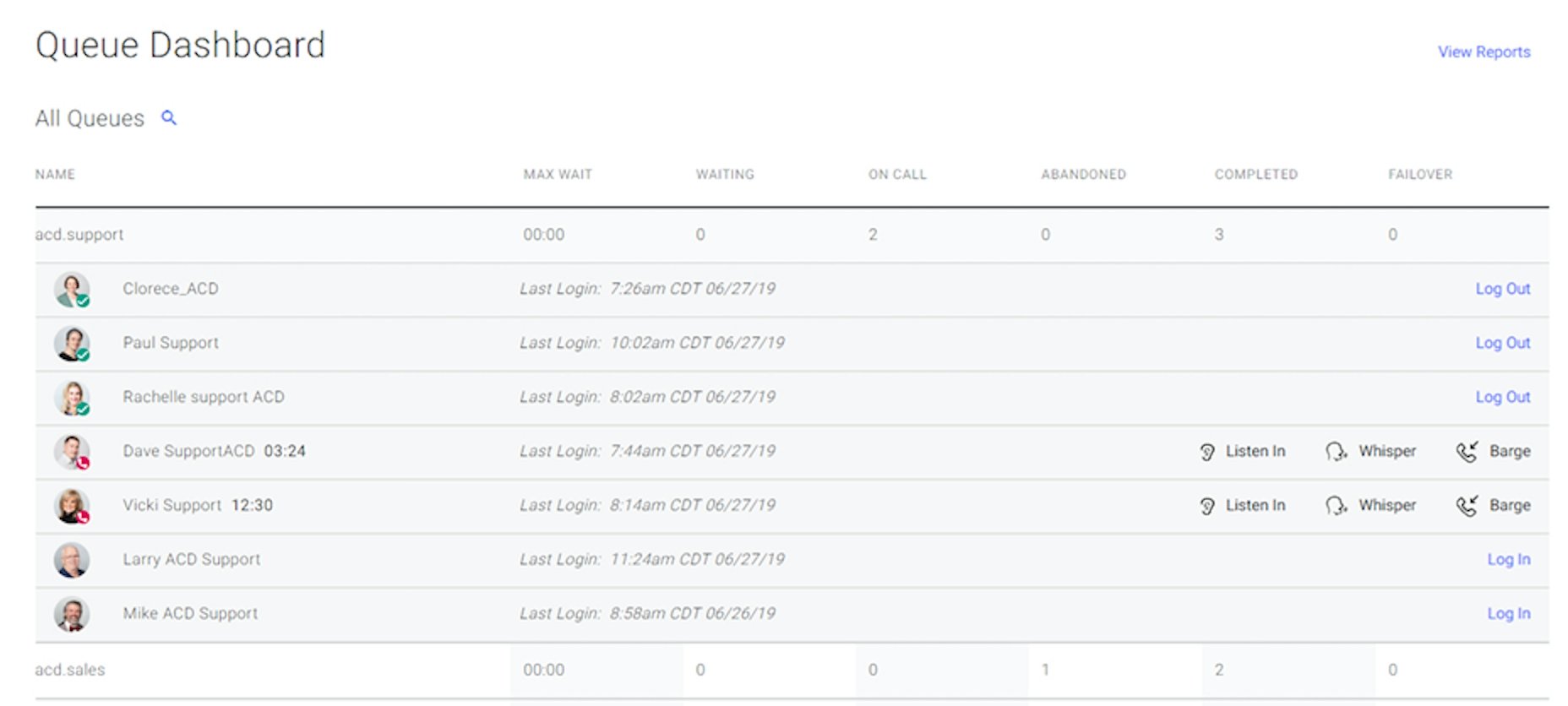
The Enhanced Queue Dashboard also enables supervisors to generate automated queue performance reports. These reports compile comprehensive queue stats and call agent data for a user-selected time period.
#5: Call Monitor/Call Whisper/Call Barge
Helpful call monitoring abilities are also available in the Enhanced Queue Dashboard:
- Listen In: Supervisors can listen in on a live queue call without the call agent or caller knowing that she is there.
- Whisper: While listening in on a call, this option lets supervisors speak to the agent without the caller knowing.
- Barge: Supervisors can enter a call to speak with both the agent and the caller.
These monitoring and barging capabilities are essential to ensuring that call agents follow your business’s customer service best practices. They’re also invaluable for coaching your agents or providing a more personalized level of support to the caller.
#4: The OnSIP Mobile App
The OnSIP mobile app is our mobile softphone for customers. Available for iOS and Android devices, the mobile app enables you to make and receive business calls on your smartphone.
You can also listen to and delete work voicemail messages, video call coworkers, and add in custom contacts for one-click calling from the mobile app. Redialing a call from your recent call history list is as easy as tapping on the number with your finger, while app settings let you turn on Do Not Disturb for times when you need the app to remain silent.
The mobile app puts your business phone right onto your smartphone so that you can respond to callers whether you’re in the office, at home, or on business travel.
#3: The OnSIP Admin Portal
Our admin portal, built right into the OnSIP web app, provides you with all of the tools you need to successfully administer your phone account. In there, you'll find: Helpful setup wizards that guide account administrators when creating OnSIP features; A support hub where admins can quickly call our support team, open a ticket, and access key Knowledgebase articles; Options to download and print a variety of documents; And much more.
#2: Video Conference Calls
Your staff members need the flexibility to hold on-demand video conference calls when they find themselves working remotely. They’ll have that ability within the OnSIP web and desktop app.
Starting a video conference there is simple: Click on the video conference link, type in a name for your call, and tap the Start button. Coworkers who use the OnSIP web or desktop apps can quickly join your video call from within their own apps. If external callers need to video call in, send them the conference call’s unique weblink—they’ll be able to video call into your conference from within their web browser windows.

OnSIP video conferencing is critical for your staff to continue holding team standups or department meetings when everyone is away from the office.
#1: The OnSIP Desktop App
Equip your staff members with their own personalized, portable, and full-featured communication softphone: the OnSIP desktop app.
Available for Windows, Mac, and Linux machines, OnSIP’s desktop app enables your employees to collaborate with coworkers and respond to clients. While a few of the app’s features were mentioned above (like screen share and video conferencing), it also lets you:
- Make and receive calls
- Video call coworkers
- Review and delete voicemail messages
- Type in-app chat messages with coworkers
- Transfer calls to colleagues via drag-and-drop
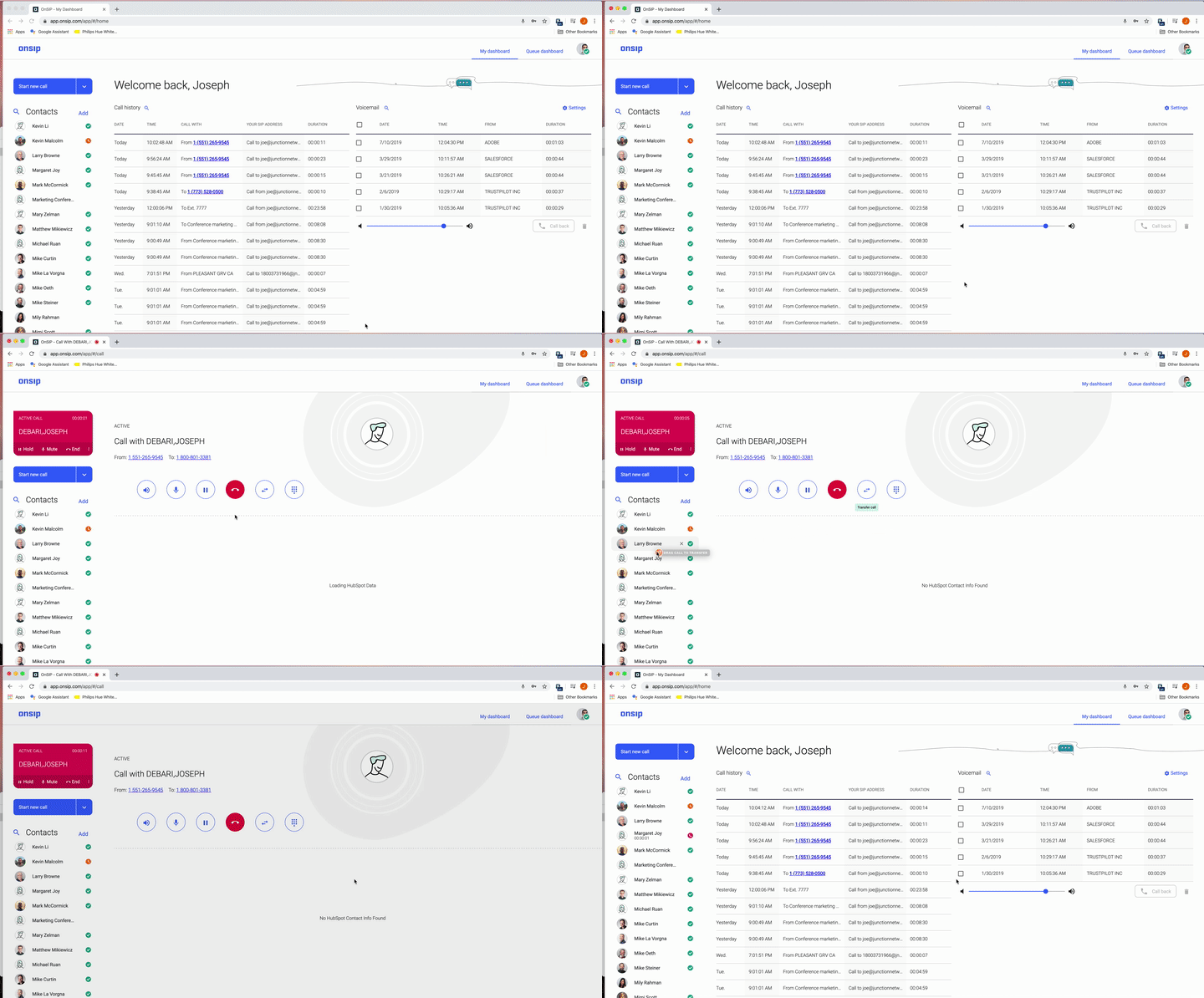
Once the desktop app is on your computer or laptop, you may even find that you don’t need a desk phone anymore!
Hosted PBX Features That Turn Calls Into Better Customer Experiences
The hosted PBX features listed here are just a small fraction of what your staff members will get with OnSIP. By deploying our platform at your organization, you’ll have a professional and unified phone system full of business calling features, collaboration options, and integrations with productivity and CRM applications. Download our Features Guide to see the complete list.