


How many calls did your business miss last week? Most owners can't say. The callers who hung up can.
A virtual receptionist would catch them all for you. Sometimes called an automated receptionist or auto attendant, it answers every call, offers a short menu, and routes each caller to the right destination. This guide covers how it works, where it fits, and three sample call flows you can model your own on.
What Is a Virtual Receptionist?
A virtual receptionist is a business call feature that automatically answers calls to your business's main line with a pre-recorded message and presents callers with a handful of call routing options. These options automatically send callers to other destinations in your business phone system, like your Sales Department’s ACD queue or a dial-by-name directory of everyone in your organization. No hold music, no missed calls, no staff member stuck answering the same basic questions all day.
You configure this feature in your hosted VoIP provider’s admin portal. There, you record or upload your customized message. You also select a destination for each number and symbol on a telephone keypad. For instance, when a caller presses ‘1’ on his touch tone (DTMF) phone keypad, you can have him automatically sent to the sales queue. When a caller presses ‘2,’ you can have him sent to the support queue. When a caller presses ‘3,’ you can have him sent to the dial-by-name directory. And so on. You customize it to meet your business needs.
An example script for this phone system feature is: ‘Hello! Thank you for calling Acme Car Parts. If you’d like to learn more about the products that we sell, please press '1.' If you have any questions about a product that you’ve purchased, please press '2.' For our address and hours of operation, please press '3.'’ ...
If your employees have phone extensions, it can handle those, too. Callers can dial the extension of the employee they’d like to talk with once the recorded message starts playing. Or, in phone greeting parlance: ‘If you know the extension of the party you wish to reach, you may dial it at any time.’
Typically, these virtual features are set to automatically answer each and every inbound call to your business’s main phone number. In that sense, they are literally virtual receptionists—automated recordings that take a receptionist’s place by answering calls and connecting callers with the person that can resolve their questions.
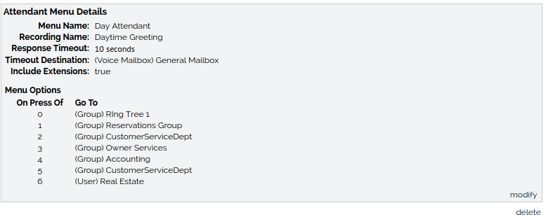
One Feature, Three Names
Virtual receptionist, automated receptionist, and auto attendant all describe the same thing: an automated phone menu that answers your calls and routes them based on caller input.
- Virtual receptionist – the everyday name. It describes the job: answering and directing calls the way a front desk would.
- Automated receptionist – describes the method. Software answers, not a person.
- Auto attendant – the technical name. It's the term you'll see in phone system settings and admin portals.
The name changes. The setup doesn't: a recorded greeting, a set of keypad options, and a destination for each one. Learn how auto attendants work.
Virtual Receptionist vs. The Alternatives
The term gets applied to a few different things, and the distinctions matter when you're shopping for a solution. Here's how it compares to the call features and services it's most commonly compared with:
Virtual Receptionist vs. In-House Receptionist
A traditional receptionist is a full-time employee: someone who answers phones, greets visitors, manages schedules, and handles the front desk in person. That's valuable, but it comes at a cost. Salary, benefits, training, and coverage gaps when they're sick or on vacation add up quickly. A digital replacement handles the call routing and greeting functions automatically, around the clock, at a fraction of the cost. The trade-off: it can't greet a walk-in customer or handle tasks that require a physical presence.
Virtual Receptionist vs. Live Answering Service
A live answering service connects your callers to a real human, just one who works remotely for a third-party agency rather than in your office. They can take messages, answer basic questions using a script you provide, schedule appointments, and transfer calls. It's a more personal experience than an automated system and better suited for businesses where callers expect a human on the other end. The downside is cost: live answering services typically run higher than automated solutions, and quality can vary by agency.
Virtual Receptionist vs. Voicemail
Voicemail is a fallback option for when you or a staff member can’t answer the phone. When a caller reaches voicemail, the interaction is essentially over; they leave a message and wait for a callback. A virtual automated greeting keeps the call active, presenting options and routing the caller toward a person or department who can efficiently address their needs.
3 Virtual Receptionist Call Flow Examples
Flow 1: Open and closed hours
Scenario: A dental office, open weekdays 8–5. The front desk covers the phones by day. Nobody covers them at night.
Open greeting
Thank you for calling Ridgeline Dental. To book or change an appointment, press 1. For billing questions, press 2. For our address and hours, press 3. To reach someone by name, press 4. If you know your party's extension, dial it now.
Closed greeting
Thank you for calling Ridgeline Dental. Our office is closed. We open at 8 a.m., Monday through Friday. To leave a message, press 1. To hear our address and hours, press 2.
Why it works: Callers get answers at any hour. Staff start the day with a voicemail list, not a string of missed calls.
Flow 2: Multi-department menu
Scenario: A building-supply distributor with separate sales, support, and billing teams.
Greeting
Thanks for calling Harbor Supply. For a quote or to place an order, press 1. For help with an order you've received, press 2. For invoices and payments, press 3. To find someone by name, press 4. For anyone else, press 0.
Why it works: Callers pick by need, not by org chart. Repeat customers who know their rep skip the menu. Sales and support calls line up in queues, so no one rings out. The 'press 0' option keeps a human path open for odd requests. Unanswered calls default to Sales, so a possible new customer never lands in a dead end.
Flow 3: After-hours emergency routing
Scenario: An HVAC company. Most after-hours calls can wait until morning. A no-heat call in January can't.
After-hours greeting
You've reached Summit Heating and Air. Our office is closed. If you smell gas, hang up and call 911 now. For a no-heat or no-cooling emergency, press 1 to reach our on-call technician. For anything else, press 2 to leave a message. We return messages by 8 a.m. the next business day.
Why it works: The caller decides what counts as urgent, so the technician's phone rings only for real emergencies. Everyone else gets a clear promise about when they'll hear back.
More Than Call Routing: The Real Benefits of a Virtual Receptionist
Doing more than just answering phone calls, this virtual call feature can meaningfully change how callers experience your company while also reducing the amount of time your team spends managing incoming calls. Here's a closer look at what it looks like in practice:
Every Caller Gets a Response—Every Time
A human receptionist can handle one call at a time. When a second call comes in, that person waits on hold (or worse, gets a busy signal and hangs up). A digital assistant has no such limitation. It answers every call simultaneously, presents each caller with the same professional greeting, and routes them without delay.
Your Team Gets to Focus on Higher-Value Work
How much time does your staff spend answering the same handful of questions: your hours, your address, and whether a particular person is available? An auto attendant can handle all of that automatically, fielding routine inquiries and routing simple requests before a live person ever has to get involved. The result is a team that spends less time on call triage and more time on the work that helps your business grow.
It Makes Your Business Sound like a Bigger Operation than It May Be
There's a reason why large enterprises have always used automated business phone systems: they convey scale, structure, and professionalism. A small business with a well-built digital receptionist projects exactly the same impression. Callers hear an organized, proficient greeting and assume they've reached a company that has is long-established and deeply-rooted. That perception has real value, particularly for businesses still building their brand.
Callers Get Where They Need to Go without Being Shuffled Around
Call transfers frustrate customers. Being put on hold, rerouted, or asked to explain your issue to a second person when you thought you were already talking to the right one...this all adds up to a bad customer service experience. A digital receptionist eliminates that friction by letting callers self-select their destination from the moment the call connects. Fewer transfers, shorter wait times, and a better experience for everyone involved.
24/7 Coverage without the Overhead
Business doesn't stop at 5 PM, and neither do customer calls. Configured with an after-hours menu, an auto attendant continues answering calls long after your team has logged off, routing urgent matters to a mobile or on-call line, directing non-urgent callers to a voicemail box or recorded announcement, and ensuring that every caller gets a response whenever they choose to call.
It Scales with Your Business
As your call volume grows, it grows alongside it. There's no need to hire additional staff to handle increased inbound traffic because the feature handles as many simultaneous calls as you receive. You can also update menus, add new routing options, or adjust greetings as your business evolves, without any specialized technical knowledge required.
The Front Desk That Never Clocks Out
A virtual receptionist is one of those features that's easy to overlook until you consider what happens without it: calls going unanswered, callers getting shuffled around, opportunities quietly slipping away at the edges of the workday. Put one in place, and all of that changes.
Whether your priority is capturing more leads, reducing the workload on your team, projecting a more professional image, or simply making sure no call goes unanswered after hours, this virtual call greeter can handle it all.