


Do you ever wish that your coworkers could reach you on your cell phone just by dialing a short extension? Or maybe you want calls that are made to your work extension failover to your cell phone if you aren’t able to answer them at your desk.
OnSIP enables you to add external phone numbers to your account and use them as call destinations and call failovers. Take advantage of this useful capability to extend your communication range and options!
External Phone Numbers: How to Add Them to Your OnSIP Account
External phone numbers are any numbers that are outside of your business’s OnSIP account. Some examples include: employees’ cell phone numbers, the owner’s home office phone number, and phone numbers of external parties who may be doing temporary/contractual work for your business.
Adding an external number(s) to your OnSIP account only takes a few simple steps. While logged into the Admin Portal, you add the number in the Resources tab and assign it a descriptive name. Save the number to your account and it will then be ready for use in your business’s call settings.
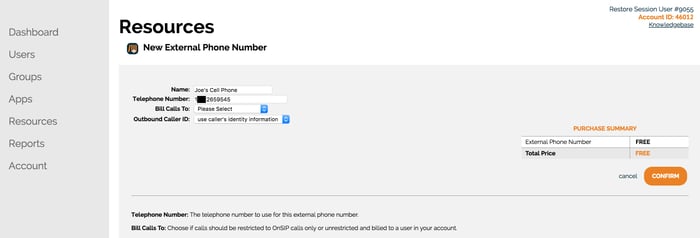
For more information on how to configure an external phone number on your account, please see our Knowledgebase article on the topic.
Send Business Calls to External Numbers
Once an external phone number has been added to your OnSIP account, you can incorporate it into your call flow in a variety of useful ways. Consider the following examples:
Let Coworkers Extension Dial Your Cell Phone Number
In the OnSIP Admin Portal, you can assign an extension to your cell phone number. Doing so will make it easier for coworkers to reach you on your cell phone when you’re away from the office. Rather than making them dial the full 11-digit number, all they'll have to do is dial the short extension that’s assigned in its place.
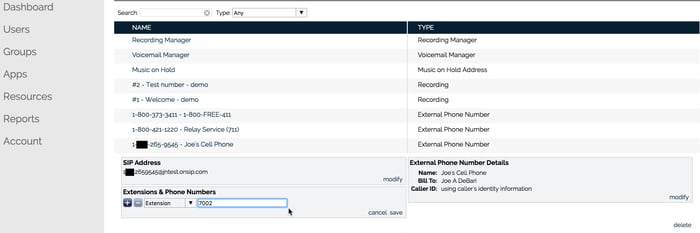
Need to Step Away from Your Desk? Continue an Ongoing Call by Transferring It to Your Cell Phone
You’re in the middle of an important call on your desk phone, but you have to leave your office and head to a doctor’s appointment. By having an extension assigned to your cell number, you can quickly and seamlessly transfer the call to your cell phone. Dial your cell number’s extension, answer the call on your cell phone, and continue the conversation while traveling to your appointment.
Send Work Calls to Your Cell Phone If You Can’t Answer Them on Your Desk Phone
When calls to your work number or work extension aren’t answered, the typical failover destination is your voicemail. But, instead of sending unanswered calls to voicemail, you can change the failover destination so that they are sent to your cell phone (an example of a capability known as Find Me, Follow Me). That way, you’ll be able to answer your work calls wherever you find yourself working.
.jpg)
Or, Send Work Calls Directly to Your Cell Phone in the First Place
Perhaps you know ahead of time that you’ll be away from your desk for a day or longer— you may have jury duty or are going on a business trip. Bypass your desk phone altogether and immediately send all of your work/extension calls to your cell phone. This can be quickly accomplished in the Users section of the OnSIP Admin Portal; just open your user profile and select your cell phone number in the Inbound Call Preferences box. All inbound calls will instantly be sent to your cell phone.
Set an External Number as a Failover for Menus, Queues, or Groups
If you have an auto attendant answering calls to your business’s main phone number, you can set an external number as the failover destination, in case the caller doesn’t select an option from the attendant menu. You can also forward unanswered calls in a ring/hunt group to an external number so that you don’t miss out on sales opportunities or support requests.
Please note that outbound calls to external phone numbers are subject to standard calling rates.
Like this blog?
Check out our other posts on different types of phone numbers that you can use at your business: